We use cookies to try and give you a better experience in Freshdesk.
You can learn more about what kind of cookies we use, why, and how from our Privacy policy. If you hate cookies, or are just on a diet, you can disable them altogether too. Just note that the Freshdesk service is pretty big on some cookies (we love the choco-chip ones), and some portions of Freshdesk may not work properly if you disable cookies.
We’ll also assume you agree to the way we use cookies and are ok with it as described in our Privacy policy, unless you choose to disable them altogether through your browser.
Date Available: Beta 4/23, Prod 5/21
Which customers are impacted?: Customers who have enabled Blend Income’s Login-Based Provider verification method. The “Improved Search Experience for Blend Income’s Login-Based Provider Method” feature is required in order for this new feature to work.
How to turn on: This feature will be automatically enabled on the dates listed above.
Purpose of Update and Benefit:
Lenders can now manually initiate a follow-up that will prompt borrowers to connect to their income information from using Blend Income’s Login-Based Provider verification method. This allows loan teams to utilize the Login-Based Provider method in the following use cases:
Current Behavior:
Currently, it is not possible to initiate the Login-Based Income verification method through follow-ups.
New Behavior:
Loan teams should navigate to the follow-ups tab in the lender application and search for the “Blend Login-Based Income Verification” follow-up. It can also be found by clicking on the “Income” category from the menu.
Once selected, loan team members will be able to select which borrower(s) on the loan should receive the follow-up request.
On the next screen, loan teams will be able to review the email messaging that will go out to the borrower(s) when the follow-up is submitted.
Loan teams will then see the follow-up and its status listed in the Follow-ups tab.
The borrower will receive an email after the follow-up is submitted to them by the loan team.
Borrowers will see an Income task in the borrower home. Borrowers should click “Start this section” to proceed.
On the next screen, borrowers will be asked how they want to provide income information.
Clicking “Connect your income information” will open the Login-Based Provider search modal. Borrowers can use this search modal to find their employer or payroll provider.
If borrowers instead choose to enter income information manually, or if they do not successfully log in, they will see a screen asking them to enter their information manually.
When the borrower completes the Income task, the Status in the Follow-ups tab in the lender application will change to Completed.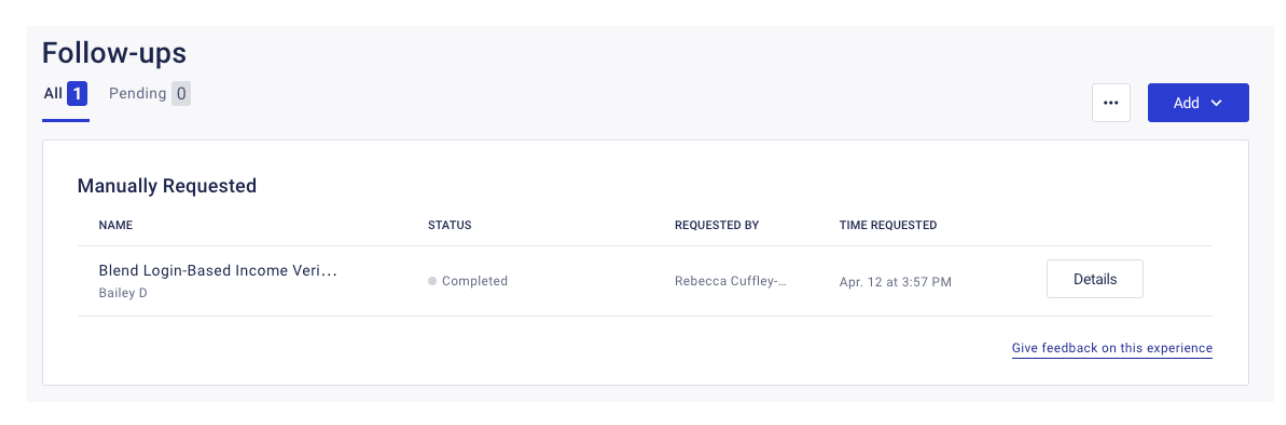
If the borrower(s) connected to their payroll provider, a Blend Income report will appear in both the borrower and lender application in the Documents and Docs tabs, respectively.
0 Votes
0 Comments
Login to post a comment